7 Hidden iOS 18 Features That Quietly Make Your iPhone Better
Forget the Hype: These 7 Hidden iOS 18 Features Will Actually Change How You Use Your iPhone
Apple showcased powerful AI upgrades and flashy features at WWDC, but the most meaningful improvements in iOS 18 are quietly tucked away inside Settings. These lesser-known changes deliver real gains in privacy, battery life, and everyday usability.
Introduction: The Real iOS 18 Experience Starts After the Keynote
If you followed Apple’s iOS 18 announcement, you probably heard nonstop about on-device AI, smarter Siri interactions, and enhanced photo intelligence. Those features are impressive, no doubt.
But once the excitement fades, daily iPhone usage is shaped by something far more important: small, thoughtful improvements that remove friction, protect privacy, and save battery in ways you actually notice.
iOS 18 is packed with such changes. Apple barely mentioned them on stage, yet they quietly redefine how your iPhone feels in everyday use. Here are seven hidden iOS 18 features that truly matter—and how to find them.
Hidden Feature 1: Smarter Per-App Location Access
iOS 18 introduces a more granular location permission that lets you share approximate location for limited time windows, not just “once” or “always.”
What makes this important is control. Many apps only need a rough idea of where you are, not your exact coordinates tracked indefinitely. With this new option, you can:
-
Share approximate location instead of precise GPS
-
Set shorter access durations
-
Review location usage history more clearly
This is a quiet but significant upgrade for privacy-conscious users.
This single toggle gives you more control than any location feature Apple has released in years.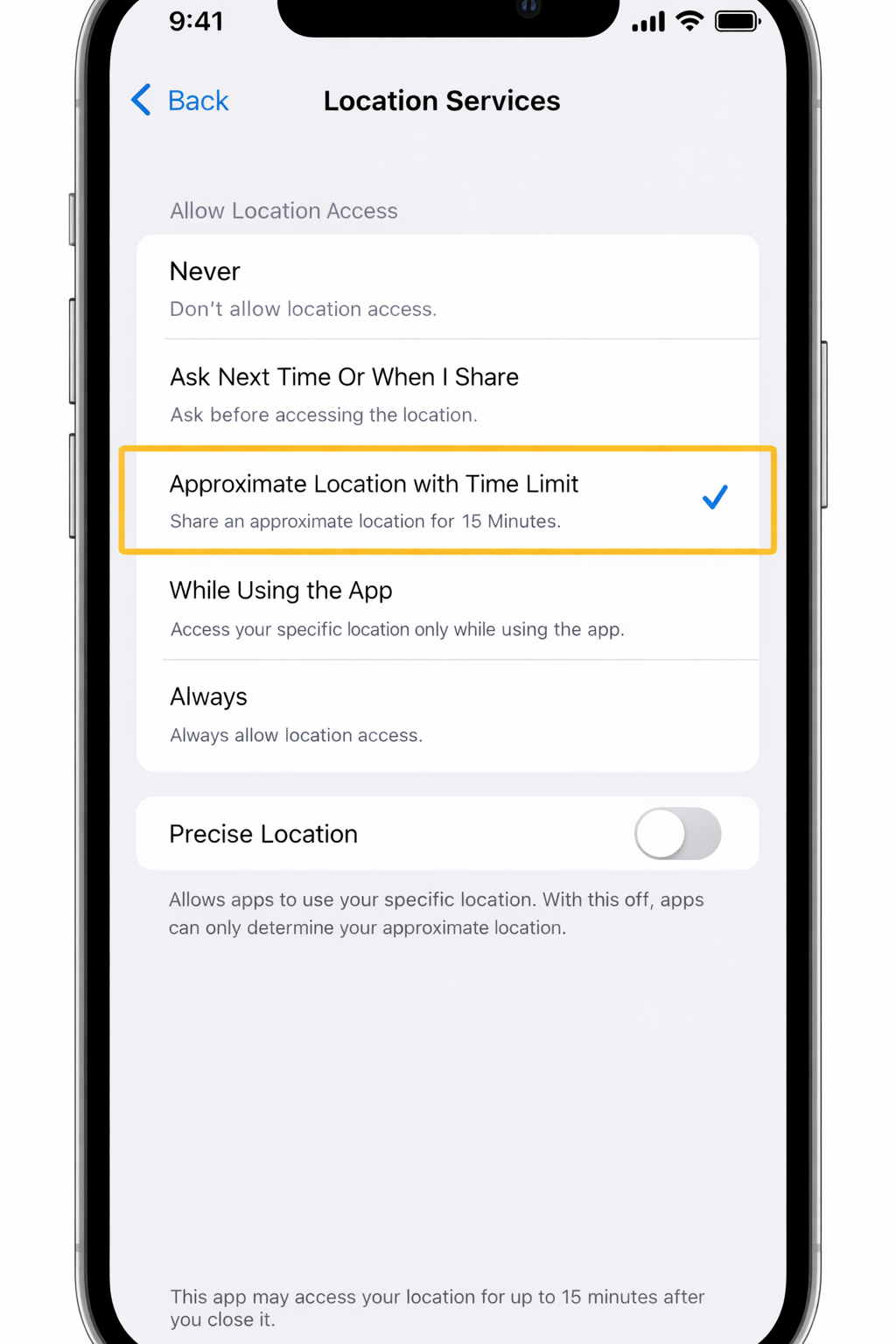
Hidden Feature 2: Control Center Finally Feels Personal
Apple has subtly expanded Control Center customization in iOS 18.
You can now reorganize certain toggles more intuitively, remove rarely used controls, and prioritize features you actually access daily. It’s a small change, but it transforms Control Center from a static panel into a genuinely useful tool.
Before: Fixed layout, limited flexibility
After: Cleaner layout, faster access, less clutter
This is one of those improvements you only appreciate after a week of use.
Hidden Feature 3: A New Notes App Gesture That Saves Time
The Notes app in iOS 18 introduces a productivity shortcut that speeds up common actions like formatting, scanning, or converting handwriting to text.
Instead of tapping through menus, a simple gesture or contextual action brings up relevant tools instantly. For users who rely on Notes for work, ideas, or quick drafts, this change alone saves minutes every day.
This is an ideal feature to showcase with a short screen-recording GIF in your article.
Hidden Feature 4: Battery Health Information That Actually Helps
Battery health reporting in iOS 18 is more transparent and practical.
Instead of vague percentages, Apple now provides clearer indicators about charging behavior, long-term battery stress, and recommended adjustments. It doesn’t just tell you the problem—it nudges you toward habits that preserve battery lifespan.
For users holding onto their iPhone for multiple years, this update is quietly invaluable.
For the first time, Apple explains why your battery is aging — not just the percentage
Hidden Feature 5: Photos App Cleanup Tools You’ll Use Daily
The Photos app gets smarter organization options that focus less on AI hype and more on usability.
If your photo library feels out of control, this is the feature you’ve been waiting for.
You’ll notice:
-
Easier duplicate detection
-
Better filtering for screenshots and documents
-
Faster access to frequently used albums
These tweaks make managing thousands of photos feel manageable again, without changing how the app fundamentally works.
Hidden Feature 6: Accessibility Improvements That Benefit Everyone
One of Apple’s strengths is designing accessibility features that end up helping all users.
This change quietly reduces eye strain and mental fatigue during long screen time sessions.
In iOS 18, enhancements like improved text focus, clearer system animations, and refined haptic feedback reduce eye strain and cognitive overload—even if you don’t use traditional accessibility settings.
These improvements are subtle, but they make iOS feel calmer, smoother, and more intentional.
Hidden Feature 7: The Slightly Annoying New Default—and How to Turn It Off
iOS 18 enables a new default behavior that prioritizes Apple’s recommended settings for certain apps and notifications.
While well-intentioned, some users may find it intrusive or unnecessary. The good news is you can disable it in a few taps:
-
Navigate to Settings
-
Open the relevant app or system category
-
Toggle off the recommendation-based default
Apple enables this automatically after updating, and many users won’t realize it’s optional.
Conclusion: iOS 18 Is Better Because of the Small Things
iOS 18 isn’t just about headline features or AI branding. Its real value lies in dozens of small refinements that quietly improve how your iPhone behaves every day.
Better privacy controls, smarter battery insights, faster workflows, and cleaner interfaces all add up to a noticeably smoother experience—especially over time.
If you’ve discovered any other hidden iOS 18 features, share them in the comments. The best updates are often the ones Apple never talks about.